14-day free trial · No credit card · No tech skills required

Website analytics
in plain English.

Website analytics built for small business owners — bakers, plumbers, coffee shops, photographers, Etsy sellers. See who's visiting, where they came from, and what's working. No jargon. No 47 menus. No degree required.

14 days free. No credit card to start.

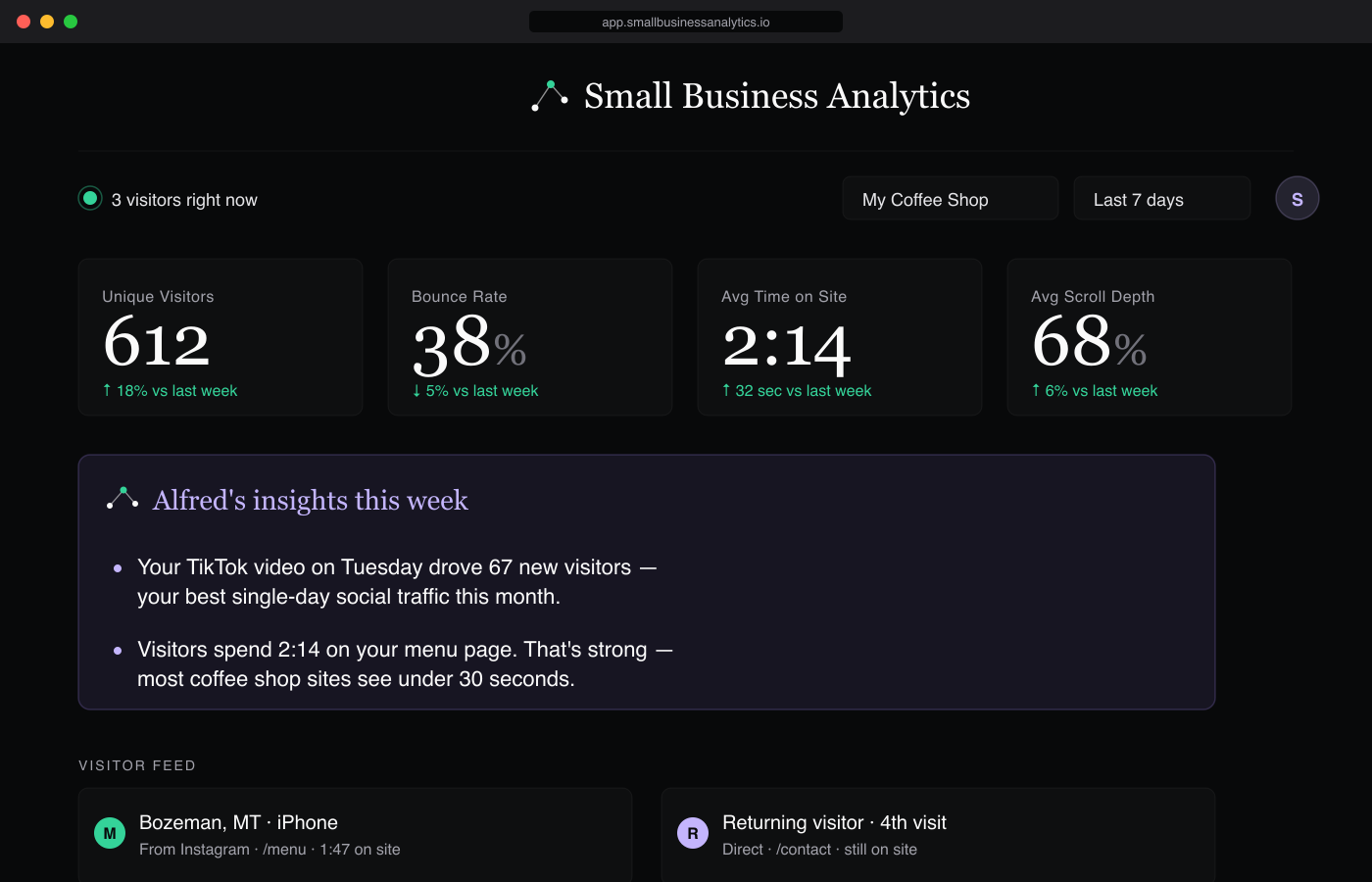
The SBA dashboard, showing live visitors, plain-English stats, and Alfred — the AI assistant — answering a question about traffic.
Alfred portrait Meet Alfred

Your AI assistant. Built right into your dashboard.

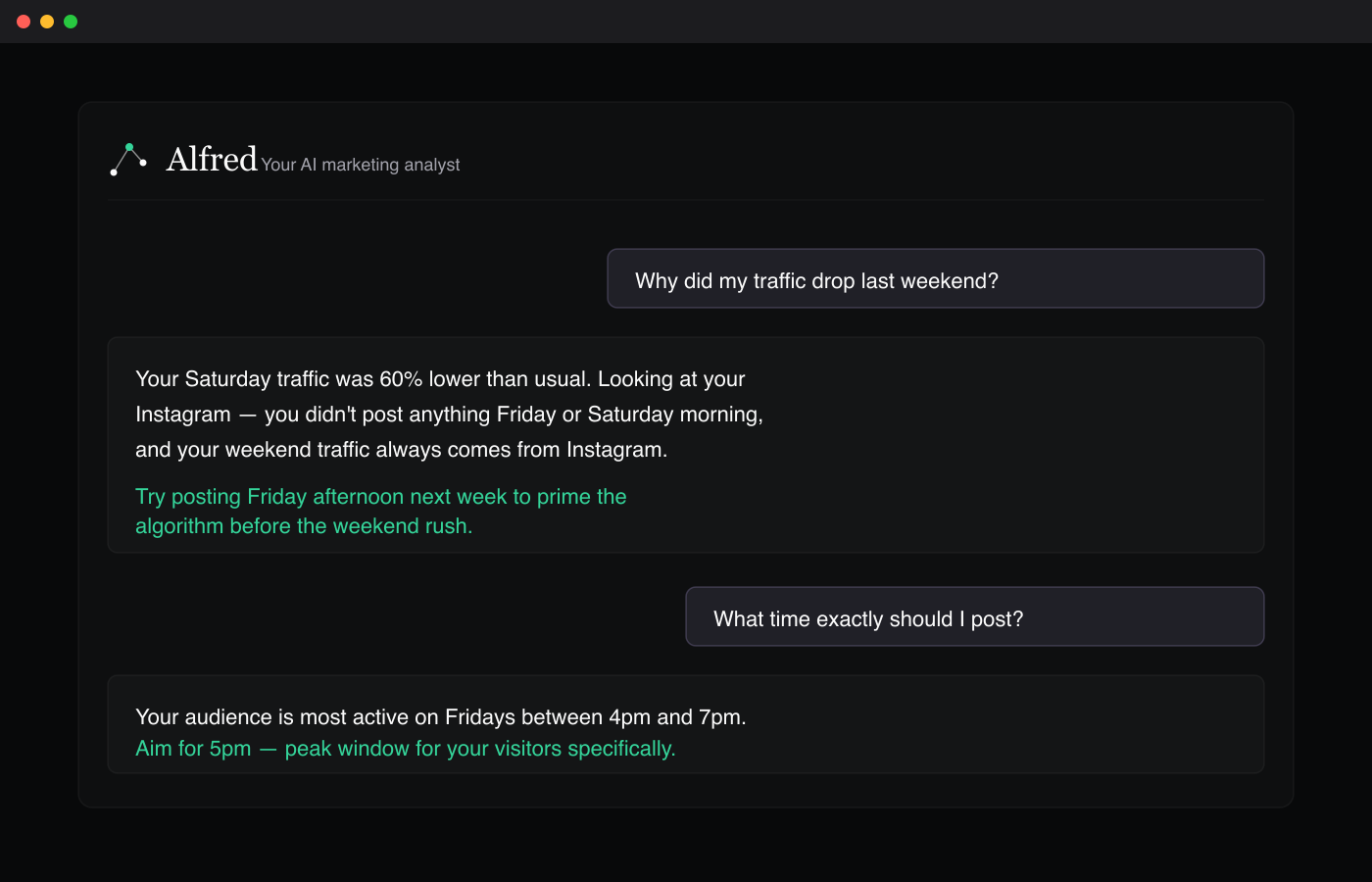
Alfred is built right into the SBA dashboard. Ask him anything about your traffic in plain English — "why did my traffic drop?", "is my Instagram working?", "what page is losing me customers?" — and he reads your actual data and answers in normal English with what to do next.

Most analytics tools show you numbers. Alfred actually answers your questions about them. Included on the Pro plan at $19/mo.

Alfred answering a question about a weekend traffic drop, suggesting the user post on Friday afternoon to prime the Instagram algorithm.
Social media tracking

Knows your Tuesday TikTok drove the spike.

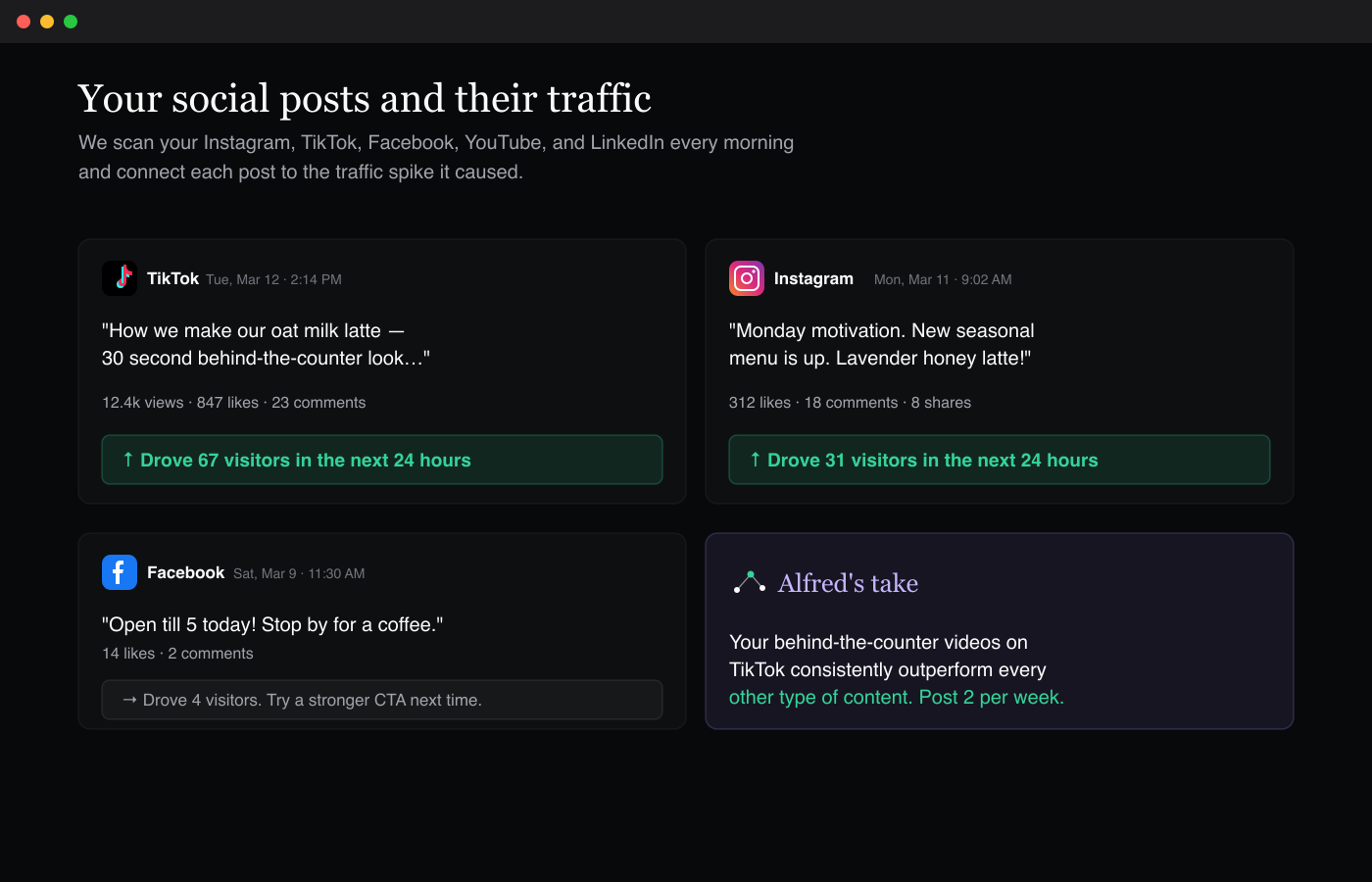
We scan your Instagram, TikTok, Facebook, YouTube, and LinkedIn every morning and connect each post to the traffic spike it caused. No tags to add, nothing to set up — we just figure it out.

For the first time, you'll know which posts actually bring people to your website — and which ones don't. Included on the Pro plan ($19/mo).

A list of recent social posts from TikTok, Instagram, and Facebook, each annotated with how many website visitors it drove.
Plain English everywhere

Every number explained in normal language.

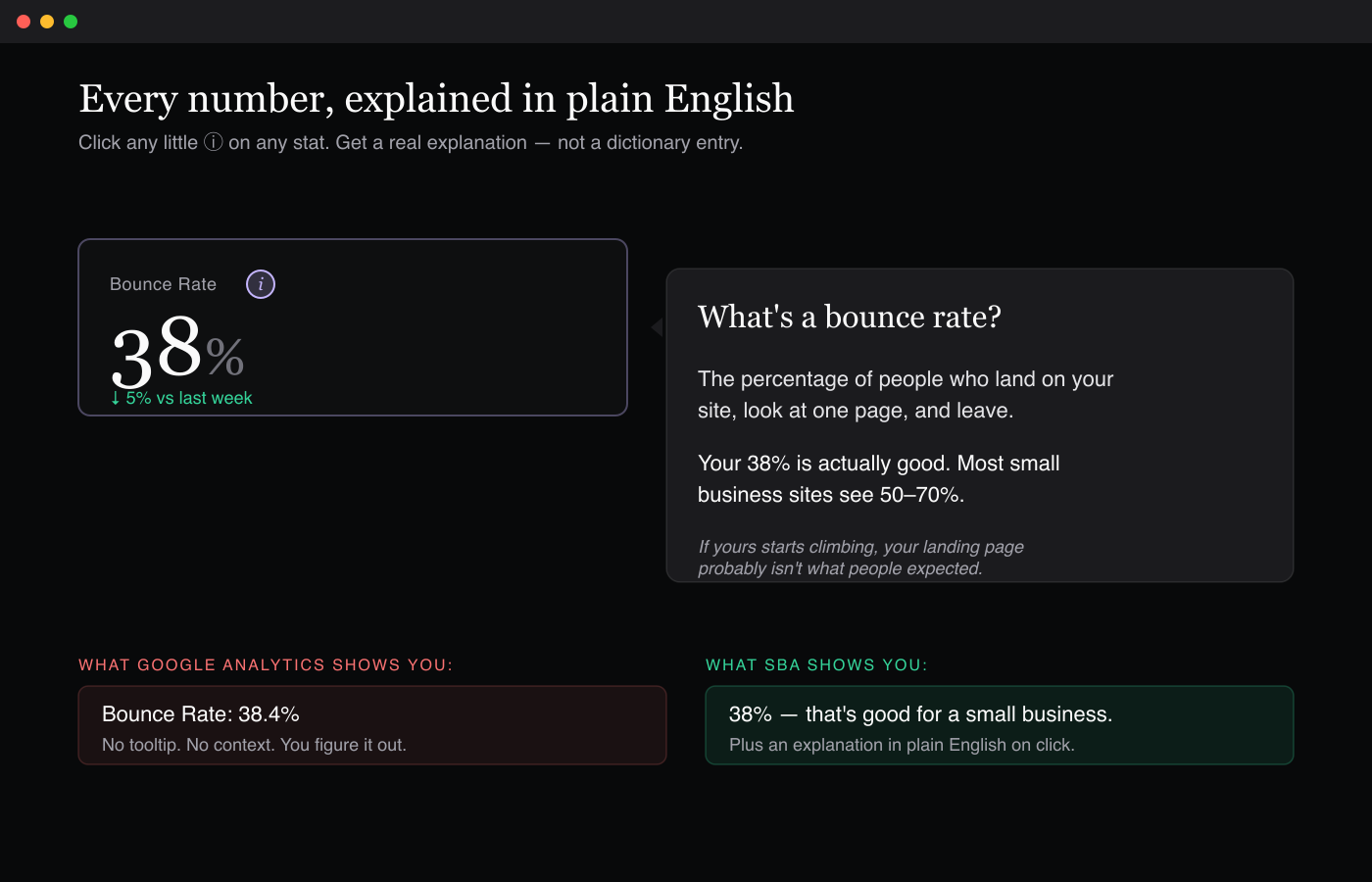
Bounce rate. Session duration. Conversion rate. None of those phrases mean anything to a normal person. So every stat on your dashboard has a little question-mark icon — click it and you get a real explanation of what that number means, whether it's good or bad for your business, and what to do if it changes.

A 'Bounce Rate' stat card with the plain-English explanation open, showing what the number means and whether 38% is good or bad.

A note from the founder

Hey — I'm Matt. I run a small business, and a while back I went looking for an analytics tool that would tell me in plain English what my website was actually doing.

I tried Squarespace's built-in one. Then Google Analytics. Then Microsoft Clarity. Then three or four others. Some were straight-up broken. None of them showed me what I actually cared about — they all just dumped tech lingo on me and expected me to figure it out.

What I actually needed was simple. Who's coming. Where they came from. What's working.

So I built it. For myself first. Then I figured fellow small business owners would probably want the same thing — plain English, common sense, built for us, not the tech industry.

— Matt, founder


Simple pricing. No surprises.

14-day free trial on every plan — no credit card to start.

Starter
$9/mo
1 site · 10,000 visitors/mo
  • See who's on your site right now
  • Every number explained in normal language
  • Download your data as a spreadsheet
  • Email support
Start free trial
Business
$39/mo
10 sites · 250,000 visitors/mo · unlimited team
  • Everything in Pro
  • Unlimited questions for Alfred
  • Give different people access to different sites (perfect for agencies)
  • When your traffic drops, AI tells you why
  • See who's been back (likely future customers)
  • Alerts when pages nobody's reading need updates
Start free trial

Need more than 250,000 visitors/month or white-label? Email us about Enterprise — we'll work it out.


Setup takes about 2 minutes.

No code. No technical mumbo-jumbo. Alfred — your AI assistant — walks you through it step-by-step the moment you sign up.

2-min install

Squarespace

See the guide →
2-min install

Shopify

See the guide →
2-min install

Wix

See the guide →
One-click plugin

WordPress

See the guide →
2-min install

Webflow

See the guide →
All platforms

Any other site

View all install guides →

Sign up, paste one line of code (Alfred shows you exactly where), and you're done. See the full step-by-step for your platform →

On WordPress? Even easier — install our free one-click plugin straight from your dashboard. Search "Alfred Website Analytics" under Plugins → Add New, click install, done.


Questions people ask before signing up

How is this different from Google Analytics?
Three differences. Every number on your dashboard is explained in plain English — no jargon. SBA automatically scans your Instagram, TikTok, Facebook, YouTube, and LinkedIn every morning and connects each post to the traffic it caused. No setup, no code, no marketing tags to add. And Alfred, the AI assistant built into your dashboard, answers questions in plain English and figures out what's going wrong when something is. Most analytics tools show you raw numbers; SBA explains what they mean and what to do.
What does Alfred actually do?
Alfred reads your real site data and answers questions like "why did my traffic drop last week?" or "is my Instagram working?" in plain English with concrete next steps. He also writes a Monday-morning summary email, and on the Business plan he automatically diagnoses traffic drops and suggests recovery actions. Alfred is included on Pro ($19/mo) and Business ($39/mo).
Is there really a free trial?
Yes. Every plan starts with a 14-day free trial, and you don't need a credit card to start — just sign up and go. You get full Pro-level access the whole time. When the trial ends, you add a card and choose a plan to continue. Nothing is ever charged automatically.
What platforms does it work on?
Every major website builder: WordPress, Squarespace, Shopify, Wix, Webflow, Weebly, GoDaddy, and any other site. We give you a tiny line of code — paste it in once and you're done. WordPress users get an even easier option: our one-click plugin. Our AI install assistant walks you through it step-by-step if you're not technical.
Is it privacy-friendly? Do I need a cookie banner?
SBA doesn't use cookies. We use a simpler system that doesn't store anything personal about your visitors. For most websites this means you don't need to show a cookie banner. Your visitor data stays in your dashboard only — we never sell it or share it.
How does it figure out which social post brought in visitors?
We watch the timing of your posts against the timing of your visitor spikes. If you post a TikTok at 11am and visits spike between 11:08 and 11:45, we connect that post to the spike. It's not magic — it's just pattern matching against real timing data. We don't need access to your social media logins; we just read public post timestamps. It's accurate enough to tell you which posts are working and which aren't.

Try it free for 14 days.

Cancel anytime, no charge.

Start your free trial →